
Navigation

  • Skip to Content
NTNU Home

NoWiN

  • Info
    • Welcome
    • Table of contents
    • Guide
    • Background
    • Downloads
    • Vocabulary tables
    • Vocabulary list (a - å)
  • Chapter 1
    • Anton
    • Boyana
    • Catalina
    • Dai Wu
    • Grammar
    • Pronunciation
    • Listening exercises
    • Exercises
    • Vocabulary
    • Extras
  • 2
    • Anton
    • Boyana
    • Catalina
    • Dai Wu
    • Grammar
    • Pronunciation
    • Listening exercises
    • Exercises
    • Vocabulary
    • Extras
  • 3
    • Anton
    • Boyana
    • Catalina
    • Dai Wu
    • Grammar
    • Pronunciation
    • Listening exercises
    • Exercises
    • Vocabulary
    • Extras
  • 4
    • Anton
    • Boyana
    • Catalina
    • Dai Wu
    • Grammar
    • Pronunciation
    • Listening exercises
    • Exercises
    • Vocabulary
    • Extras
  • 5
    • Anton
    • Boyana
    • Catalina
    • Dai Wu
    • Grammar
    • Pronunciation
    • Listening exercises
    • Exercises
    • Vocabulary
    • Extras
  • 6
    • Anton
    • Boyana
    • Catalina
    • Dai Wu
    • Grammar
    • Pronunciation
    • Listening exercises
    • Exercises
    • Vocabulary
    • Extras
  • 7
    • Familie
    • Fritid
    • Grammar
    • Pronunciation
    • Listening exercises
    • Exercises
    • Vocabulary
    • Extras
  • 8
    • På tur
    • Dai Wu er syk
    • Grammar
    • Pronunciation
    • Listening exercises
    • Exercises
    • Vocabulary
    • Extras
  • 9
    • På kontoret
    • På konferanse
    • Grammar
    • Pronunciation
    • Listening exercises
    • Exercises
    • Vocabulary
    • Extras
  • 10
    • Til Oslo
    • Jul i Norge
    • Grammar
    • Pronunciation
    • Listening exercises
    • Exercises
    • Vocabulary
    • Extras
  1. Info
  2. Mobile

Språkvelger

NoWiN

×
  • Welcome
  • Table of contents
  • Guide
  • Background
  • Downloads
  • Vocabulary tables
  • Vocabulary list (a - å)
MENU

Mobile

NoWiN on your mobile device

Scan the QR code or type the URL to the right to open the mobile menu.
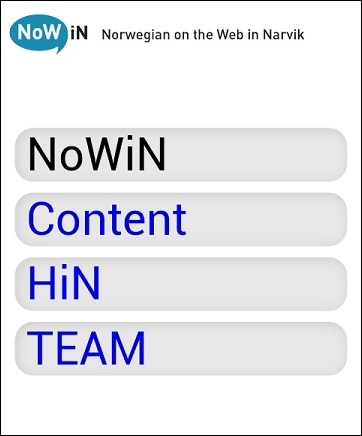
NoWiN mobile menu

You will have four options:

NoWiN:  Directly to NoWiN
Content:  To the content page from which you go to the preferred lesson
HiN: Information about Narvik University College
Team: Members of the NoWiN team and how to contact them.

This menu will take you to the standard desktop formatted pages, since NoWiN does not support mobile optimized ones. However, there are several resources that will run smoothly on mobile devices, as for instance the flashcard exercises or the sound tracks for each text. Whether you will be able to read the actual texts comfortably, largely depends on the size of your screen.

Add a button to your home screen

iOS Android
- Open the NoWiN mobile menu
  in your browser.
- Click the Add button at the bottom
  of the screen.
 
- Click Add on Home Screen.
- Open the NoWiN mobile menu
  in your browser.
- From the Settings menu select
  Add shortcut.

 

Done!  
Now you can access the NoWiN mobile menu directly from you home screen.



Mobile Bilde


www.hf.ntnu.no/mnowin

Editorial responsibility | Use of cookies | Privacy policy
Sign In